 appfly
Get your app
ready to launch.
Make store screenshots, promo videos, icons, and an app website.
Write and translate your listing, for the App Store and Google Play.
Create your store screenshots.
Turn your app screens into store screenshots for the App Store and Google Play. Add device frames, text, and backgrounds, then export the sizes you need.
Learn moreFrom your app screens
to your launch assets.
Add your app screenshots. Create your visuals, review the text, and export the files for your release.
Start for freeDesign a full screenshot set
feature.An example social graphic
Nothing is sent until you push or submit.
Make a short video of your app
in action.
Give people a place to learn about your app
Write a short description and add your app screenshots and links. Rewrite any section with AI as shorter, punchier, benefit-led or longer, or restyle the whole site in one click.
Learn moreA short description
of your app.
An example app website
View on the App StorePrepare the text for your store listing
Start with your app details. Generate a draft, then edit the title, description, and other listing text.
Learn moreAI where you already work
In beta, on Pro. Ask for a screenshot set, promo video, icon, or listing text and follow each step live. It uses the same tools as the Appfly MCP server, so you need no AI agent of your own.
Learn moreFrom draft to live, in one place
Edit listing text and screenshots for each language in Appfly, then push them to an editable App Store version or to your Google Play listing. Available with Pro.
Learn moreEdit your app assets
in your browser.
Arrange your app screens, edit your visuals, and review the result before export.
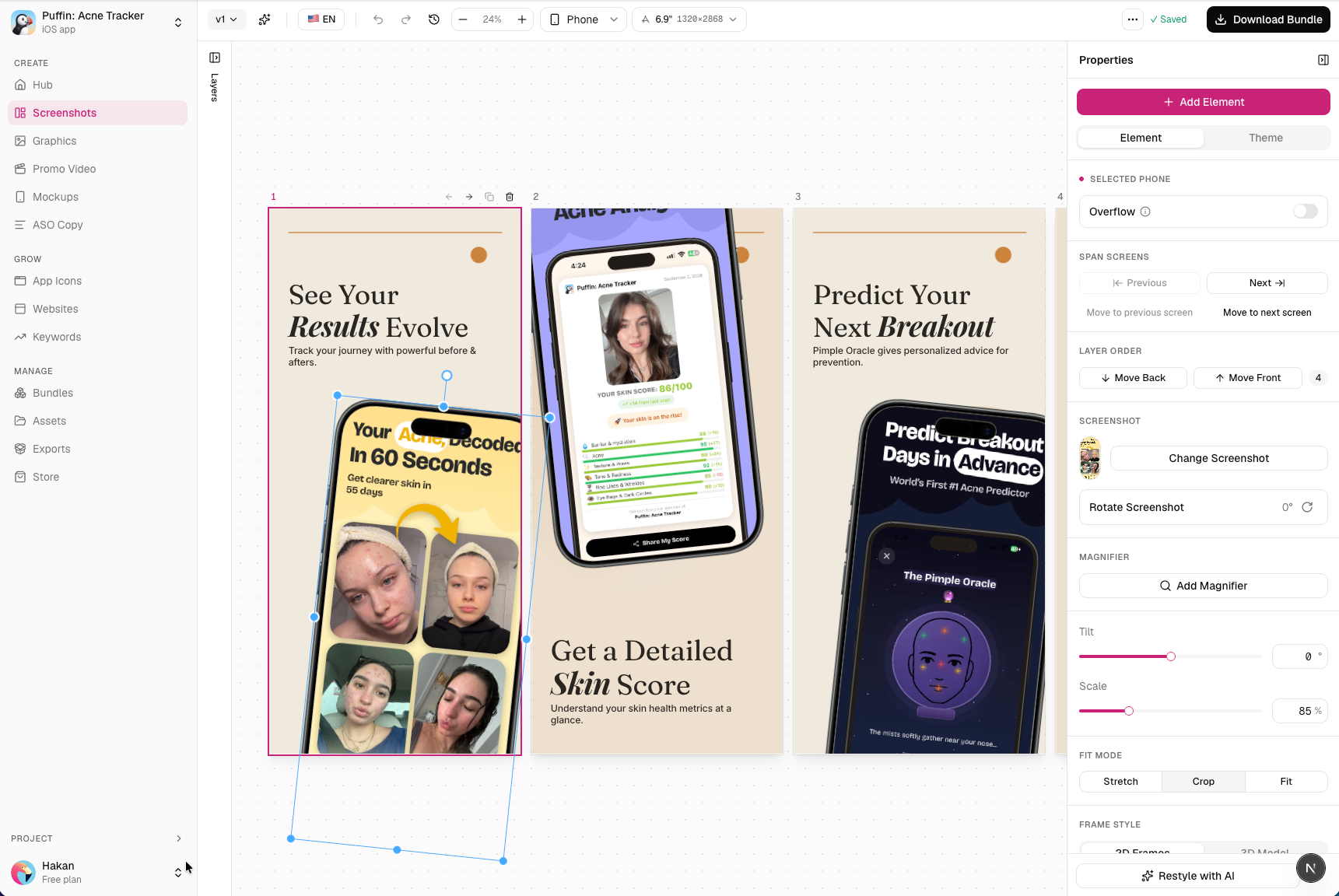
The tools for your
next app release.
Create visuals, prepare your listing, and publish an app website in one workspace.
App Connect
Send screenshots and listing text to the App Store or Google Play. Available with Pro, which can also submit a release to App Review or roll out a build, and track it.
AI writing and translation
Generate a first draft of your listing or translate your text. Review and edit the result before publishing.
Make launch assets
with your AI agent.
Use Claude, Cursor, or another compatible MCP client to create screenshots, generate promo videos, edit text, and export your files.
Explore Appfly MCP
Bring your tech stack
together
Manage releases in App Store Connect and Google Play, and connect your AI tools through MCP.
View all integrations


Questions about
getting started.
What is Appfly?
Appfly is a browser app for mobile app developers. It works with the App Store and Google Play. It helps you create store screenshots, promo videos, device mockups, icons, and graphics. You can also write and translate your store listing and publish an app website.
What do I need to get started?
Start with your app details and a few screenshots. Choose a template, then edit the text, colors, and layout in your browser. You can add screen recordings when making a video.
What does the free plan include?
Free includes one app, access to the editors, one app website, and limited AI credits. Free exports have a watermark and a size limit. Solo and Pro include full-resolution exports without a watermark. An export costs 100 credits on Free and 50 credits on Solo and Pro.
Do unused AI credits carry over?
No. AI credits reset to your plan's monthly amount each month, including on yearly plans, and unused credits do not roll over.
Can I translate my screenshots and listing?
Yes. Solo and Pro include screenshot and listing translations. Review each language and edit the text before you export or publish.
Does Appfly submit my app to a store?
Only when you ask it to. On Pro you connect App Store Connect or Google Play, send your screenshots and listing text, and take a release further, through App Review on the App Store or to a rollout on Google Play. Solo and Free export your files and you upload them yourself. With Pro, releases are where you push your changes, submit them to App Review, and track the result from Appfly.
Does Appfly support Google Play?
Yes. Connect your app with a service account, then with Pro send your listing text, screenshots, and feature graphic to Google Play and roll out a build you uploaded. Appfly does not upload app bundles, and custom store listings and experiments stay in Play Console. On Solo and Free, export your files and upload them in Play Console yourself.
Can I use my own website domain?
Yes, with Pro. You can also publish your website using an Appfly address on any plan.
Do you offer an Enterprise plan?
Yes. Enterprise is for companies with many apps or custom needs, such as custom AI credits, invoicing, or contract terms. Tell us about your use case on the Enterprise page and we will reply with a proposal. It includes dedicated support with a named contact and priority response. Solo and Pro include email support.
Where can I ask a question or report a bug?
Email [email protected] for questions or support. You can also report a bug on GitHub through the Contact page. Include the tool you used, what you expected, and what happened.
From your first screenshot
to your next launch.
Create the assets around your app in one place. Make screenshots, render a promo video, and publish your app website.
Start for free